
Appearance
Skip to content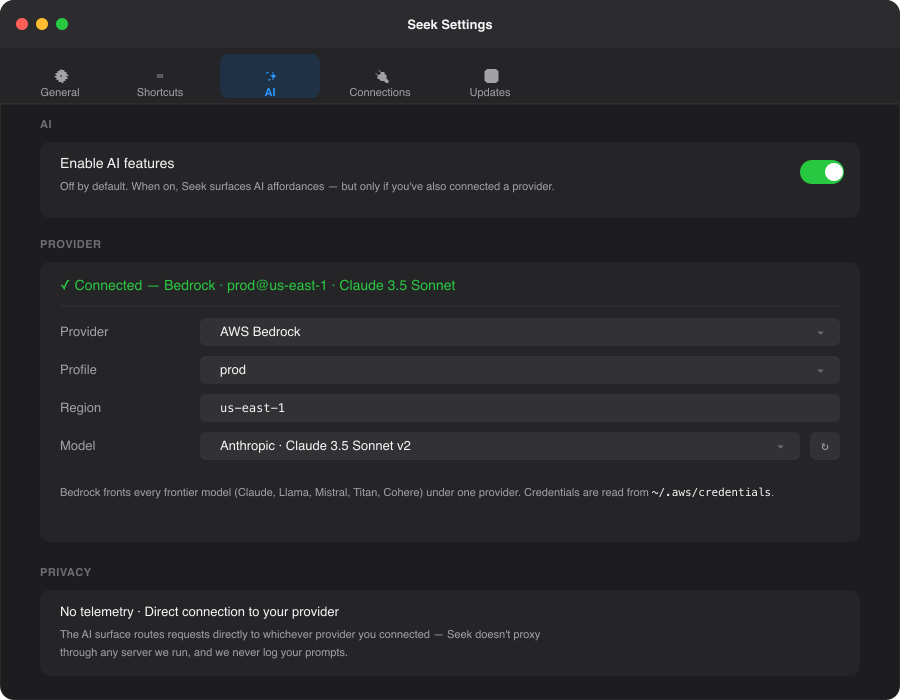
Open a folder or file you've been to before.
Show a folder or file in Finder.
Build a Spotlight-style search filter.
Run a saved snippet by name.
Open a saved SFTP / S3 / WebDAV connection.
Plain-language reply when no verb fits.
Optional AI, your provider, read-only
Seek ships without an AI provider connected. Turn it on if you want it. Skip it if you don't. Every Seek feature still works without a single API key. When AI is on, the launcher gains a layer that translates natural-language requests into the same verbs the keyboard already exposes.
Pick your provider
Four first-class options. One slot per provider in the macOS Keychain — switch between them with a picker; the right credentials follow.
LOCAL
Ollama / llama.cpp
Seek auto-detects Ollama on port 11434 and llama.cpp on port 8080. Pick a model from the dropdown — it's populated with what you've actually pulled, not a generic list.
- No data leaves
localhost - No API key required
- Works offline by definition
- No model bundled in the DMG
CLOUD
OpenAI-compatible
Any endpoint that speaks /v1/chat/completions — OpenAI proper, vLLM, LiteLLM, OpenRouter, your own gateway. Bring your own key.
- Stored in macOS Keychain
- No proxy through our servers — direct connection
- Streaming responses for diff / commit summaries
CLOUD
Anthropic
Direct connection to Anthropic's /v1/messages API. Claude 3.5 Sonnet, Haiku, Opus.
- Stored in macOS Keychain
- Same direct-connection model
- Streaming responses
CLOUD
AWS Bedrock
Every frontier model under one provider — Claude, Llama 3.1, Mistral, Titan, Cohere. Reads credentials from your ~/.aws/credentials profile (the same file the AWS CLI uses).
- No API key field — uses your AWS profile
- Pick profile + region; model dropdown populates from
ListFoundationModels - SigV4-signed requests, no SDK dependency
Read-only by design
The AI can read, navigate, and search. It cannot delete, move, overwrite, or commit. Destructive verbs stay deterministic — you type the exact command.
Why the boundary? Even GPT-4 picks the wrong file 5–10% of the time. A 1B local model picks worse. Read-only means a hallucinated file path can't reach your filesystem — at worst, the AI shows you the wrong row, you ignore it, and pick a deterministic result.
The verb vocabulary
openOpen a folder or file you've been to before.
revealShow a folder or file in Finder.
searchBuild a Spotlight-style search filter.
snippetRun a saved snippet by name.
connectionOpen a saved SFTP / S3 / WebDAV connection.
answerPlain-language reply when no verb fits.
The path allowlist
When the AI suggests opening a path, that path has to match something you've actually opened before — recents and favourites only. If the model invents a file, the suggestion is rejected and the launcher tells you so. The model can't surface anything you haven't already touched.
This is the second safety floor: read-only verbs alone aren't enough if the AI can wander your filesystem looking for things to "open." The allowlist keeps it pinned to your real working set.
How it shows up
Press ⌘⇧Space with AI on, type "open the dotfiles repo", and a ✨ AI suggestion row pins atop the deterministic results. If it picked the right one, hit ↵. If not, ↓ ↵ on a regular row works as always — the AI is on top, not in the way.
When AI is off, a footer chip reads "Type what you want — enable AI in Settings". Discovery, not nag.
Privacy contract
No telemetry. The AI surface routes requests directly to whichever provider you connected — Seek doesn't proxy through any server we run, and we never log your prompts. We don't even know you're using AI.
- Local: stays on
localhost, never crosses your network boundary. - OpenAI-compatible / Anthropic: direct HTTPS to the provider you configured.
- Bedrock: direct HTTPS to AWS Bedrock with your AWS credentials.
Try it
macOS 14+ · Free · Open source. AI is opt-in; Seek works fully without it.